If you've ever finished what felt like the perfect podcast episode, interview, or webinar only to discover the recording quality was compromised by internet issues, you're not alone. Connection problems are one of the biggest challenges content creators face when recording remote conversations.
That's where Restream's local recording feature changes everything.
What is local recording?
Local recording is a powerful feature in Restream Studio that allows each participant in your stream or recording session to capture their own video and audio directly on their device. Instead of relying on internet bandwidth to transmit high-quality video in real-time, everyone records locally. This means the highest quality footage is saved regardless of connection stability.
The result? Studio-quality recordings up to 4K resolution, even when someone's internet decides to act up.
How does local recording work?
Local recording captures each participant's video and audio directly on their device, ensuring studio-quality footage regardless of internet connection stability.
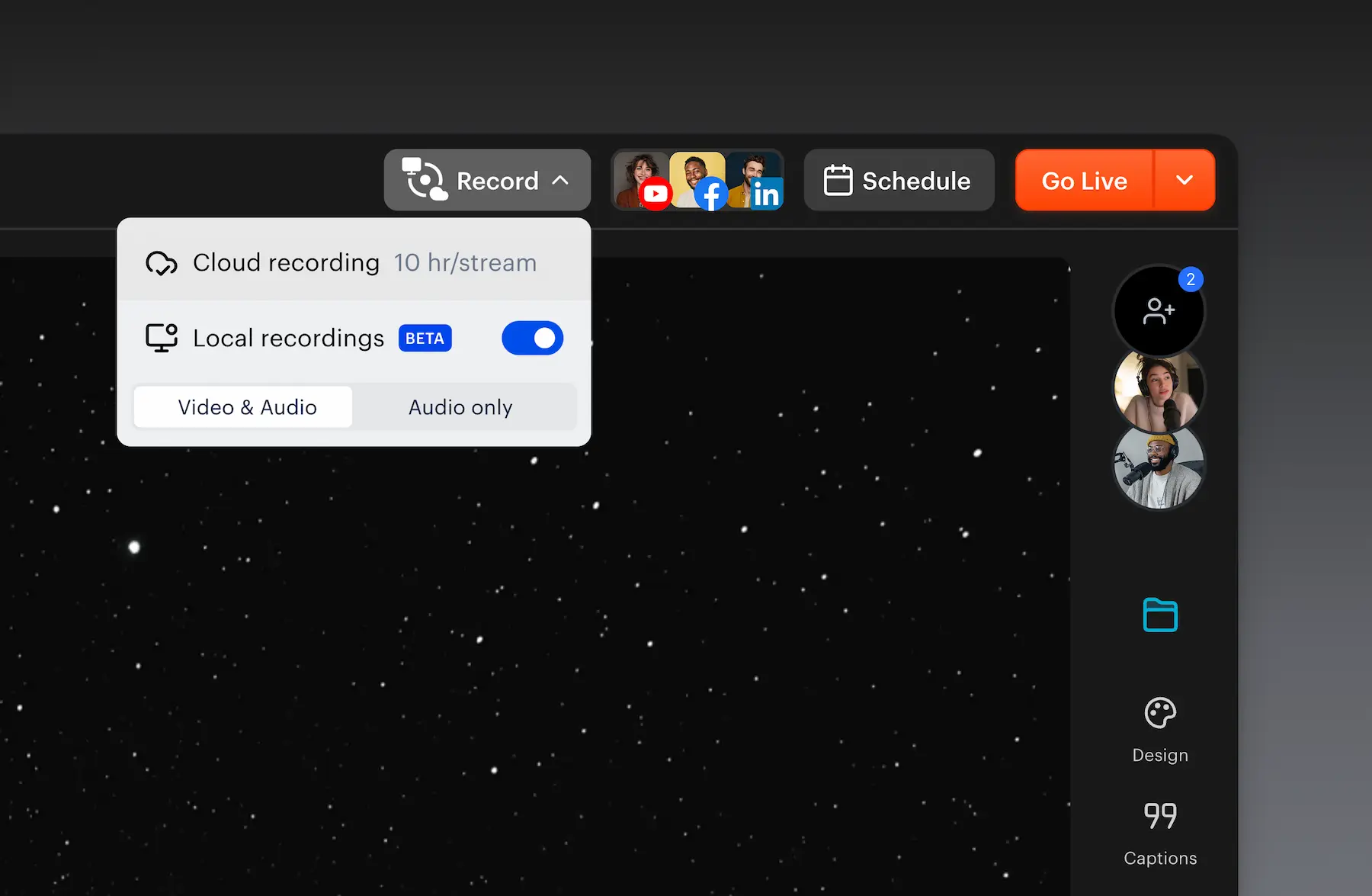
Setting it up is simple. From your Studio session, click the Record button at the top, toggle on Local recordings, and choose Video & Audio or Audio only. Then click Go Live or select Record only mode if you're not broadcasting.
That's it! Local recording happens automatically for all participants. After your session ends, all high-quality files upload to Restream's servers and sync together without any action needed from your guests. No chasing down files, no sharing Drive links - just professional-quality recordings ready for editing.
Watch the full setup tutorial →
Key benefits of local recording
Consistent, professional quality
Your recordings maintain perfect quality even when a participant's internet connection drops or becomes unstable. Since the recording happens locally on each device, connection issues only affect the live stream quality—not your final recording.
Capture up to 4K resolution with 48kHz audio
Local recording supports video resolutions up to 4K and crystal-clear 48kHz audio, ensuring your content looks and sounds crisp and professional. This is especially valuable for video podcasts, product demonstrations, and any content where visual and audio quality matter.
Zero hassle for your guests
Participants don't need to manually record, export, or share files. Everything uploads automatically after the session ends. This removes a major friction point that often delays post-production workflows.
Faster, more flexible editing
Restream provides separate audio and video tracks for each speaker, plus full project files compatible with Adobe Premiere Pro, Final Cut Pro, and other professional editing software. This makes it incredibly easy to edit out mistakes, adjust audio levels, or create dynamic multi-camera edits.
Who should use local recording?
Local recording is ideal for:
- Podcasters who want broadcast-quality audio without expensive equipment
- Interview-based content creators who need reliable recordings with remote guests
- Webinar hosts who want professional archives of their sessions
- Video podcast producers who need separate tracks for each speaker
- Internal communications teams recording company updates, town halls, and all-hands meetings for global teams where speakers and participants are distributed worldwide
- Anyone creating content where quality can't be compromised by internet reliability
Local Recording vs. Cloud Recording: what's the difference?
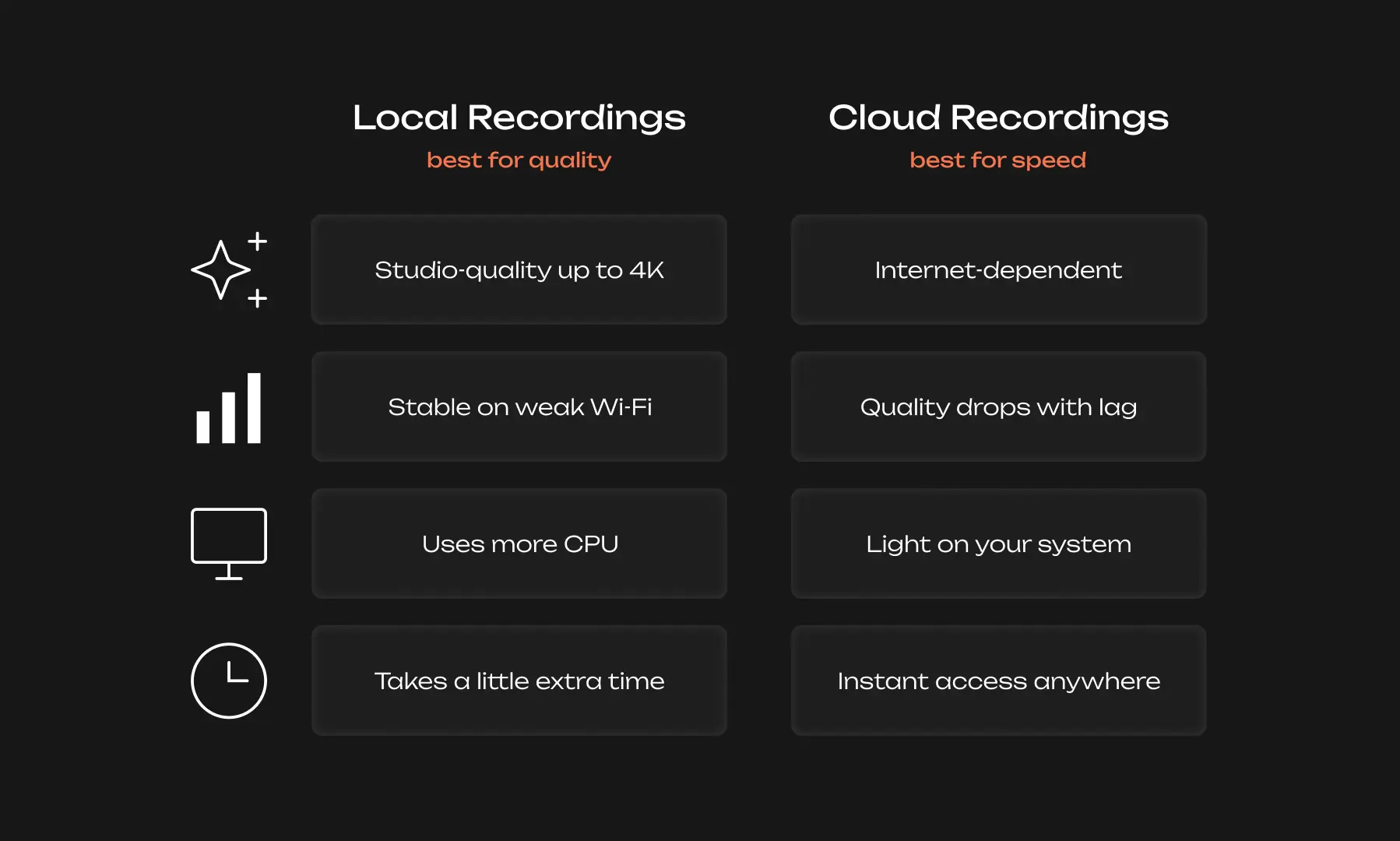
Cloud recording captures your stream as it's transmitted over the internet. This means the recording quality is limited by the weakest internet connection in your session.
Local recording captures each participant's audio and video directly on their device before it's compressed for streaming. This means you get the highest possible quality, regardless of internet performance.
Think of it this way: cloud recording is like recording a phone call, while local recording is like having everyone in the same professional studio—even when they're continents apart.
Best practices for local recording
To get the most out of local recording:
- Encourage participants to use good lighting and audio equipment since you'll be capturing high-quality footage
- Test your setup before important recordings to ensure local recording is enabled
- Allow time after your session for files to upload automatically (upload time depends on file size and internet speed)
- Have adequate storage space on your device, as 4K recordings can generate large files
Common questions
What file formats do I get?
- You'll receive separate WAV audio and MP4 video tracks for each participant, plus project files compatible with Adobe Premiere Pro, Final Cut Pro, and other major editing software.
What is and isn't recorded?
- Local recordings capture each participant’s individual tracks:What isn’t recorded: RTMP sources, Studio layouts, backgrounds, overlays, or temporary sources (images, presentations, videos from your storage).
- Camera (webcam or external)
- Microphone or external audio source
- Screen share
- Local video sources
Do participants need to do anything special?
- No. Once you enable local recording, it works automatically for all participants. They don't need to change any settings or manually upload files.
Can I use local recording for audio-only sessions?
- Yes! You can choose to record video and audio or audio-only when you enable local recordings.
The bottom line
Local recording in Restream Studio solves one of content creation's biggest pain points: ensuring professional quality when recording with remote participants. By capturing footage directly on each device, you eliminate the quality limitations imposed by internet connections.
Whether you're producing a weekly podcast, conducting customer interviews, or hosting educational webinars, local recording gives you the reliability and quality your content deserves—without the technical headaches.
Ready to upgrade your recording quality? Try local recording in Restream Studio today and experience the difference that true studio-quality capture makes.